
Announcing Soapbox Signer: A NIP-07 Browser Extension for Nostr
Introducing Soapbox Signer, our new browser extension for securely managing your Nostr identity with multi-profile support, granular permissions, and NIP-04/NIP-44 encryption.
Your Nostr private key is your identity. It's what proves you are who you say you are across the entire Nostr network. But pasting your private key into every website you visit? That's a recipe for disaster. One compromised site, one phishing attempt, one moment of carelessness—and your identity is gone forever.
Today, we're excited to announce Soapbox Signer—a browser extension that keeps your Nostr keys secure while letting you use any Nostr application seamlessly. Available now for Chrome and Firefox.
Why Use a Browser Extension for Nostr?
When you use Nostr, every action you take—posting, following, reacting, sending encrypted messages—requires cryptographic signatures from your private key. Without a signer extension, you'd need to paste your private key directly into each website. This creates several serious problems:
- Security Risk: Any website with your private key can impersonate you, access your encrypted messages, and take over your entire Nostr identity
- No Revocation: Unlike passwords, you can't change your Nostr private key. If it's compromised, your identity is permanently compromised
- Trust Issues: You have to trust every single website not to steal or leak your key
NIP-07 solves this by defining a standard way for websites to request signatures from a browser extension. The website never sees your private key—it only receives the signed events it needs. You stay in control.
How NIP-07 Keeps You Safe
With NIP-07, websites request signatures through your browser extension. Your private key never leaves the extension—websites only receive the cryptographic proof they need. It's like having a secure vault that signs documents for you without ever revealing your signature stamp.
Key Features of Soapbox Signer
Multi-Identity Support
Manage multiple Nostr identities from one extension. Switch between personal, professional, or project accounts with a single click.
Granular Permissions
Control exactly what each website can do. Approve specific event kinds, set per-domain permissions, and revoke access anytime.
NIP-04 & NIP-44 Encryption
Full support for encrypted direct messages using both legacy NIP-04 and modern NIP-44 encryption protocols.
Import & Export
Easily backup your identities or migrate between devices. Export as JSON or CSV, with clear warnings about key security.
Getting Started with Soapbox Signer
Setting up Soapbox Signer takes just a few minutes. Here's how to get started:
Step 1: Install the Extension
Install Soapbox Signer from the Chrome Web Store or Firefox Add-ons. After installation, click the extension icon to open the settings.
Step 2: Add Your Identity
You can either create a brand new Nostr identity or import an existing one using your private key (nsec).
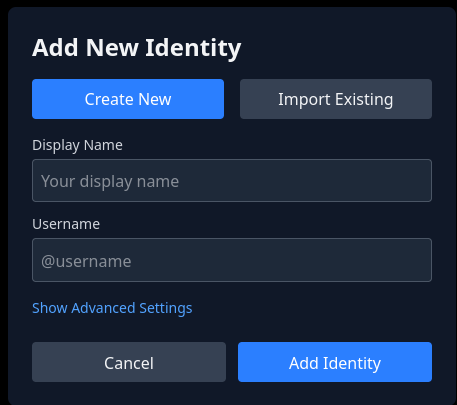
Create a new identity or import an existing one
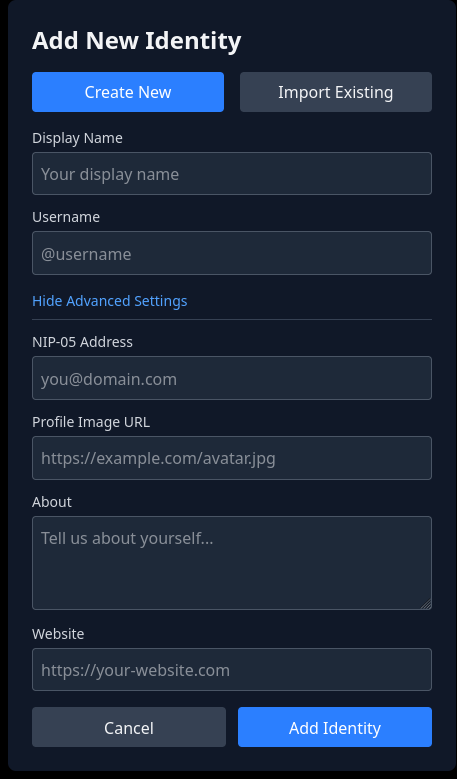
Advanced settings let you configure your full profile
The advanced settings allow you to configure your complete Nostr profile including:
- Display Name: Your human-readable name shown across Nostr apps
- Username: A short identifier for your account
- NIP-05 Address: Your verified identity (like user@domain.com)
- Profile Image URL: Link to your avatar image
- About: A short bio describing yourself
- Website: Your personal website or link
Step 3: Manage Multiple Identities
One of Soapbox Signer's most powerful features is multi-identity support. You can add as many Nostr identities as you need and switch between them instantly.
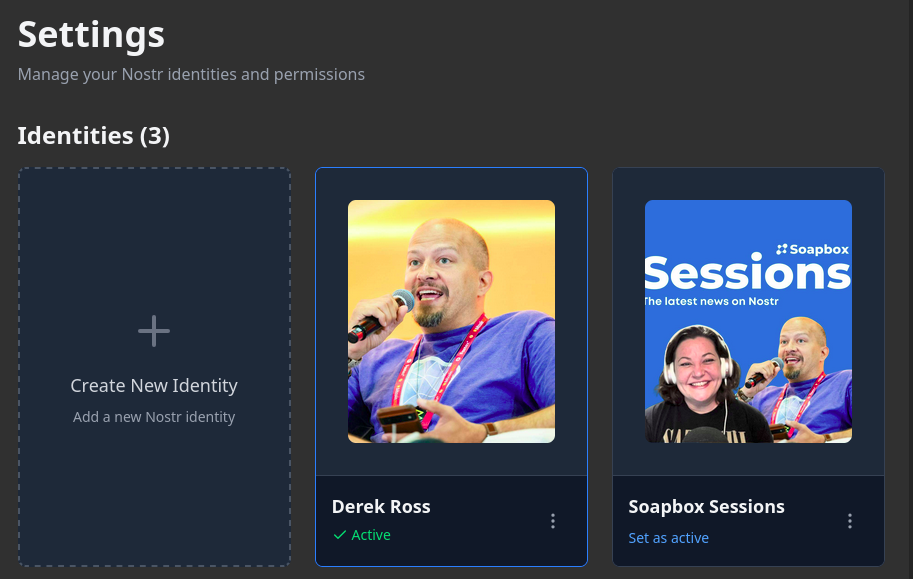
Manage multiple identities from one extension
Each identity card shows your profile picture and name. The currently active identity is marked with a green "Active" badge. Simply click "Set as active" on any identity to switch, and all connected websites will use that identity for signing.
Understanding Permission Requests
When a website needs to perform an action on Nostr, Soapbox Signer shows you exactly what it's requesting. You maintain full control over what gets signed.
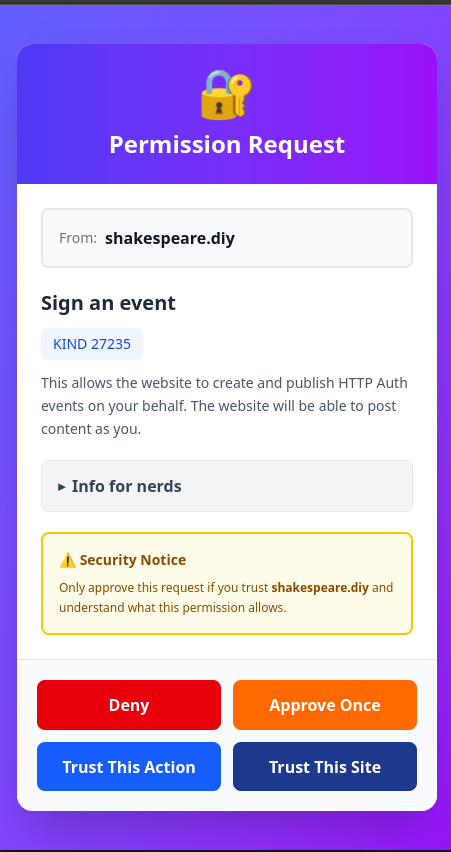
Clear permission requests show exactly what each site wants to do
Each permission request shows:
- The requesting website (e.g., shakespeare.diy)
- The action type (e.g., "Sign an event")
- The event kind (e.g., KIND 27235 for HTTP Auth)
- A description of what the permission allows
- An "Info for nerds" section with technical details
You have four response options:
Deny
Reject this request. The website won't be able to perform this action.
Approve Once
Allow this specific request only. You'll be asked again next time.
Trust This Action
Always allow this specific event kind from this website.
Trust This Site
Grant full access to this website for all event types.
Security Notice
Only approve requests from websites you trust. If you're unsure, use "Approve Once" to test the functionality before granting permanent access. You can always revoke permissions later from the settings.
Managing Connected Sites
The Connected Sites & Permissions screen gives you a complete overview of which websites have access to your Nostr identities and what permissions they have.
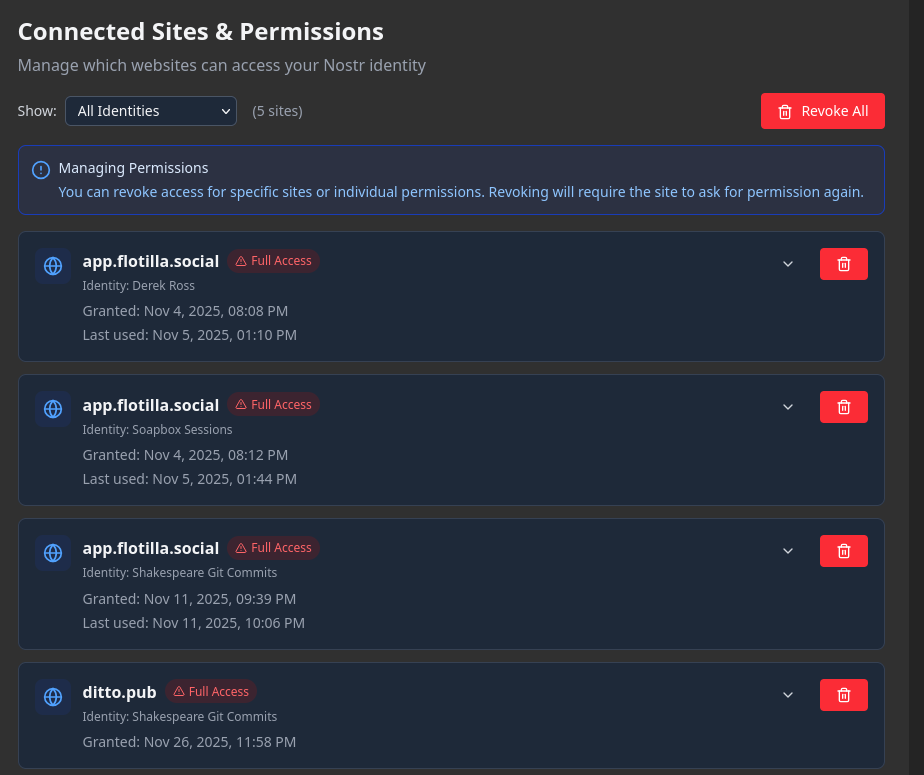
View and manage all website permissions in one place
For each connected site, you can see:
- The domain name (e.g., app.flotilla.social, ditto.pub)
- Access level (Full Access or specific permissions)
- Which identity the site is using
- When access was granted and last used
You can revoke access for individual sites or use the "Revoke All" button to clear all permissions at once. Revoking access means the site will need to request permission again the next time it needs to sign an event.
Backup and Migration
Your Nostr identities are valuable—make sure to back them up! Soapbox Signer provides easy export and import functionality.
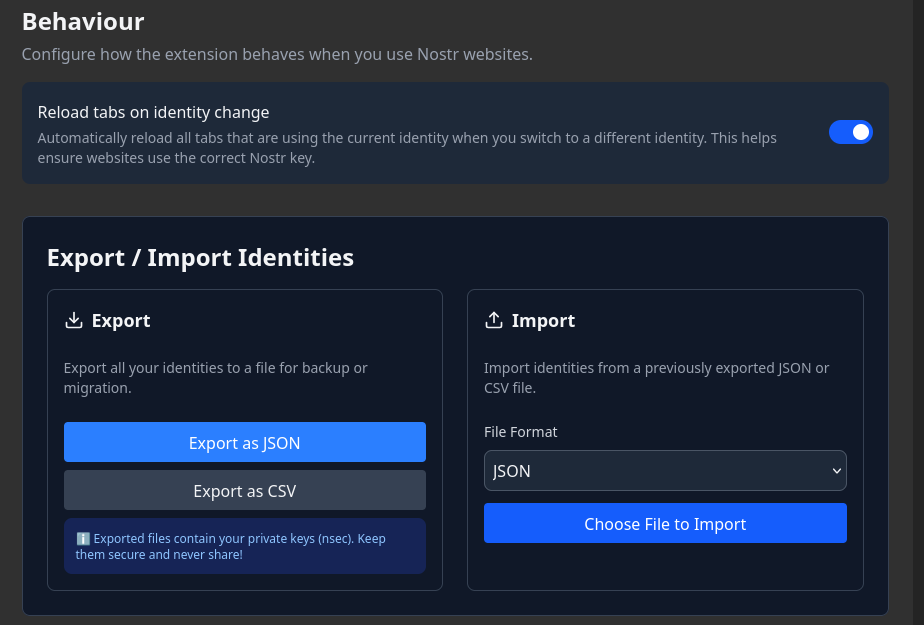
Export your identities for backup or migration
Export Options
- Export as JSON: A structured format that preserves all identity data, perfect for importing into another instance of Soapbox Signer
- Export as CSV: A spreadsheet-compatible format for easy viewing and management
Important Security Warning
Exported files contain your private keys (nsec). Keep them secure and never share them! Store backups in an encrypted location like a password manager or encrypted drive.
Import Options
To restore your identities on a new device or browser, simply choose the JSON or CSV file you exported previously and click "Choose File to Import."
Behavior Settings
The "Reload tabs on identity change" option automatically refreshes all tabs using your Nostr identity when you switch to a different one. This ensures websites always use the correct key without manual page refreshes.
Why Soapbox Signer?
There are several NIP-07 signers available, so why did we build Soapbox Signer? We wanted to create a signer that embodies our principles:
Security First
Clear permission prompts, granular controls, and transparent access management keep you in control.
Multi-Identity Native
Built from the ground up to support multiple identities—not an afterthought.
Open Source
MIT licensed and open source. Audit the code, contribute improvements, or fork it for your needs.
Get Started Today
Soapbox Signer is free, open source, and available now. Install it, add your identity, and start using Nostr applications the secure way.
Learn More
- How to Store and Manage Your Nostr Private Key - Comprehensive guide to key security
- Nostr 101: A Beginner's Guide - Understanding the Nostr protocol
- NIP-07 Specification - Technical details of the signer protocol
- Soapbox Signer Repository - Source code and issue tracker
Your keys, your identity, secured by Soapbox Signer.
Soapbox is funded by grants and donations, not ads or data sales.
Everything we build is open source and belongs to the community. Help us keep it that way.